
Our Blog
End non-responding applications with the Task Manager
It happens to all of us at some point. You are working on the computer, and suddenly the application stops responding. You try to close, minimize, move, and nothing happens. It’s just frozen! What do you do then? Well, at that point, Windows might present you with two choices. You can either wait a little bit longer and see if the application responds again or you can choose to terminate the application at that time. However, there at times in which this won’t work either. At that point, you have no choice left but to use the Task Manager to end or terminate the non-responding application.
In this situation, do the following:
- Right-click the Taskbar and click Task Manager
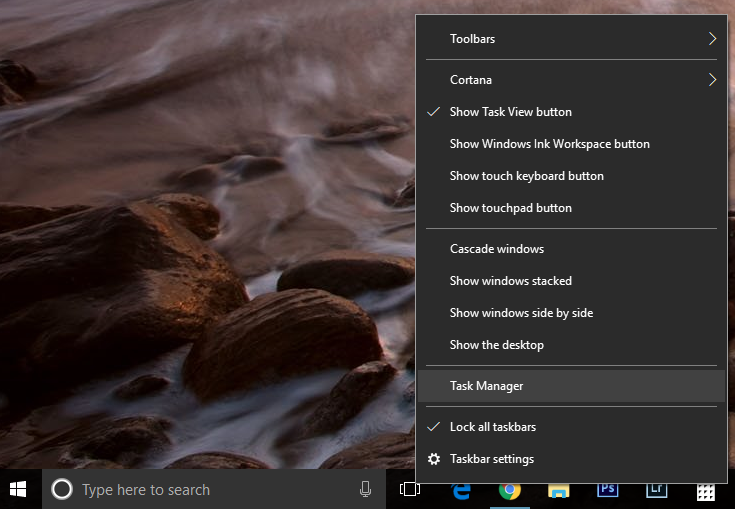
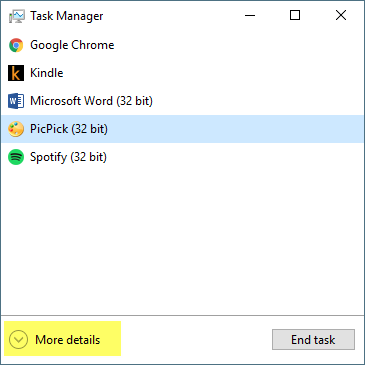
Note: For this example we are using the More details version of the Task Manager. Just click More details on the bottom left corner to expand the window.
- Look in the list for the application that is not responding. Once you find it, right-click it and choose End Task.

If for any reason you can’t terminate the application with the above steps. Try this:
- Right-click the application again, but this time, click on Go to details
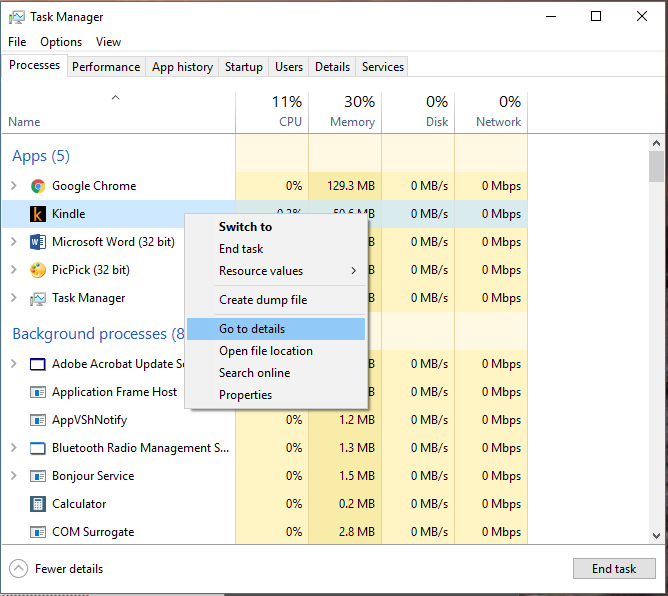
- Right-click the highlighted application, and click End process tree
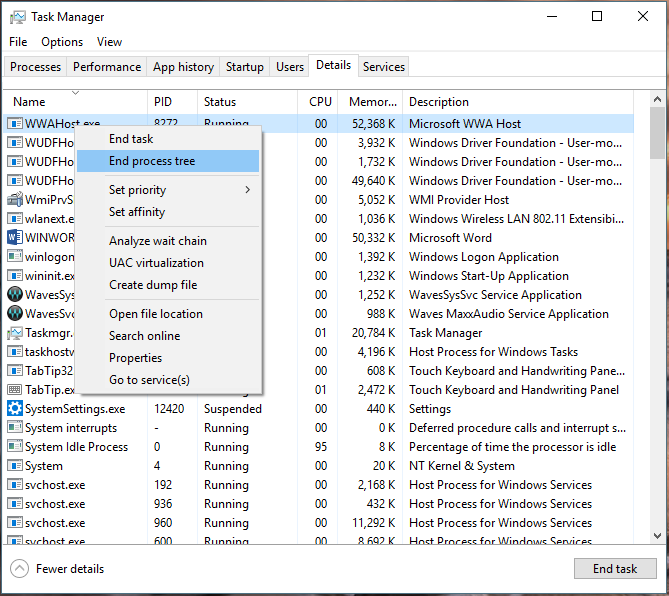
Keep in mind that ending an application with the Task Manager may result in you losing your work unless you continuously save it as you go.
Tip: If your desktop is unresponsive as well and you can’t right-click the Taskbar, press Ctrl+Alt+Delete on your keyboard and select Task Manager or Ctrl+Shift+Esc to open it directly.

Net Neutrality – The Battle is Near – Where Do You Stand?
Net Neutrality is in Danger and Needs Your Help
Here’s a simple explanation of net neutrality: Imagine if your ISP could charge sites more according to WHAT services they provide.
So, let’s say you like to watch Netflix. Soon, your ISP may be able to charge Netflix money to “escape the slow lane” as stated by www.battleforthenet.com. If they refuse to pay, Comcast, Verizon, Time Warner Cable, or ATT would be able to slow down, block, or throttle their site traffic, which would mean degraded performance for the consumer (you). If Netflix DOES pay, they would most likely have to turn around and charge you more money to cover their exorbitant costs.
This is basically Amendment 1 for the internet. Your ISP should not be able to decide or regulate our online activities.
Here’s you you can join: www.battleforthetnet.com

Linux Lovers, the New and Improved Debian 9 is here!
The New Debian Distro, “Stretch”
The new distro of the Debian line has launched, and is sure to make linux lovers everywhere.
Debian is reputable for being one of the more stable releases of the Linux architectures. Hence, it’s release cycles are wider apart than say, Ubuntu or a few of the more popular distros you have have heard of.
Speaking of Ubuntu, what’s the difference between the two distros? Here’s a small no nonsense list :
- Debian uses APT for software management (Ubuntu doesn’t, although it can).
- Since Ubuntu releases more frequently, it is always a little more up to date with regards to hardware (this is where that talk of stability comes into play).
Stretch, as the new distribution is called, now comes with five years of support, as opposed to two years with it’s previous versions.
To read more, please go to Debian’s page here.
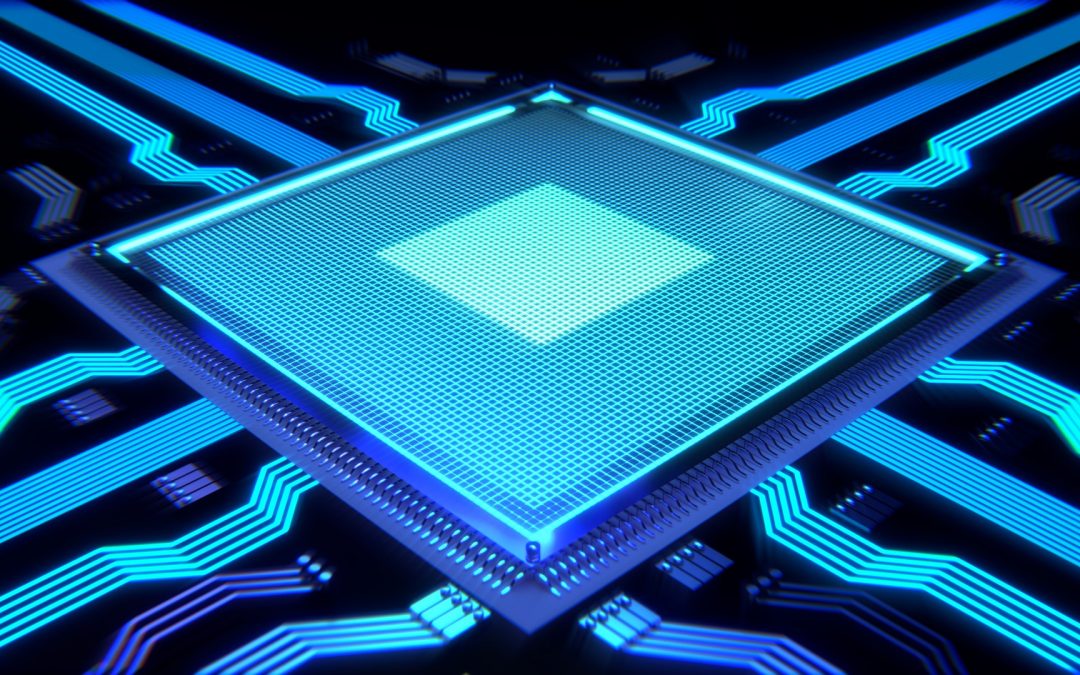
Intel’s i9-7900x – The Most Powerful Consumer Chip
The Intel i9-7900x is Here!
Not sure where everyone has been the past few days if you haven’t heard of the new i9-7900x, but it’s here. It’s the most powerful consumer chip ever sold by Intel. It boasts 10 cores at 3.3 GHz (max 4.3 GHz) with a 13.75 MB L3 cache. It also has a new chipset, the X299, and a new LGA2066 socket. The catch? Both the chipset and socket are not compatible with the previous CPUs. However, this Skylake-X chip does distance itself from it’s predecessors in a great way. The cache is much better, and so is the mesh architecture, and opposed to the ring bus architecture in the previous systems.
Now if you haven’t heard, AMD’s Ryzen chips are now here as well, and they created quite the stir in the hardware arena. On the high end, the chips have 12 and 16 core Threadtripper CPUs. This means that the battle for market share is about to get much more intense.
The Intel i9-7900x currently retails for 1,000 USD on Amazon. AMD’s Ryzen chips are cheaper at the moment, but Intel has many die-hard fans. In the core war that will most surely ensue, only time will tell.
Read more about this chip from PCWorld’s excellent article here.
Azuretech’s Best Picks for Freeware 2017
Freeware, anyone? Here are our best picks so far this year.
Anti-malware
AVG Antivirus – If you want a great freeware antivirus solution, AVG has a totally new interface and improved performance.
Malwarebyte’s Anti Malware (free edition) – the best anti-malware scanner around. Period.
Backup solutions
Google Drive – you have 15GB of free space here, and it syncs with all your devices as long as you have a Google account! Funny thing is that many people I meet have an account already and just don’t know it.
System Utilities
Belarc Advisor will give you a pretty comprehensive breakdown of your hardware and software, among other things.
CCleaner is an EXCELLENT utility for a fast system tune up.
Autoruns – want an in-depth view of everything that runs on startup? This is it.
Recuva is an excellent free tool to use if you have lost some files, or accidentally deleted them.
Want to read more? Check out these links : PCMAG.com | PCWorld